Compute Items will be assigned to one particular Portal at any one time.
When a Compute Item is assigned to a Tenant Portal, this means that the Parent Portal will lose visibility of that Compute Item. Users of the Parent Portal will need to switch to the Tenant Portal (see Viewing tenant portals ) in order to see that Compute Item.
The diagram below illustrates which Actions can be taken to allocate Compute Items to a Tenant, or to reclaim Compute Items from the Tenant. It also shows which Actions are applicable on the Tenant Portal, and which Actions are applicable on the Parent Portal.
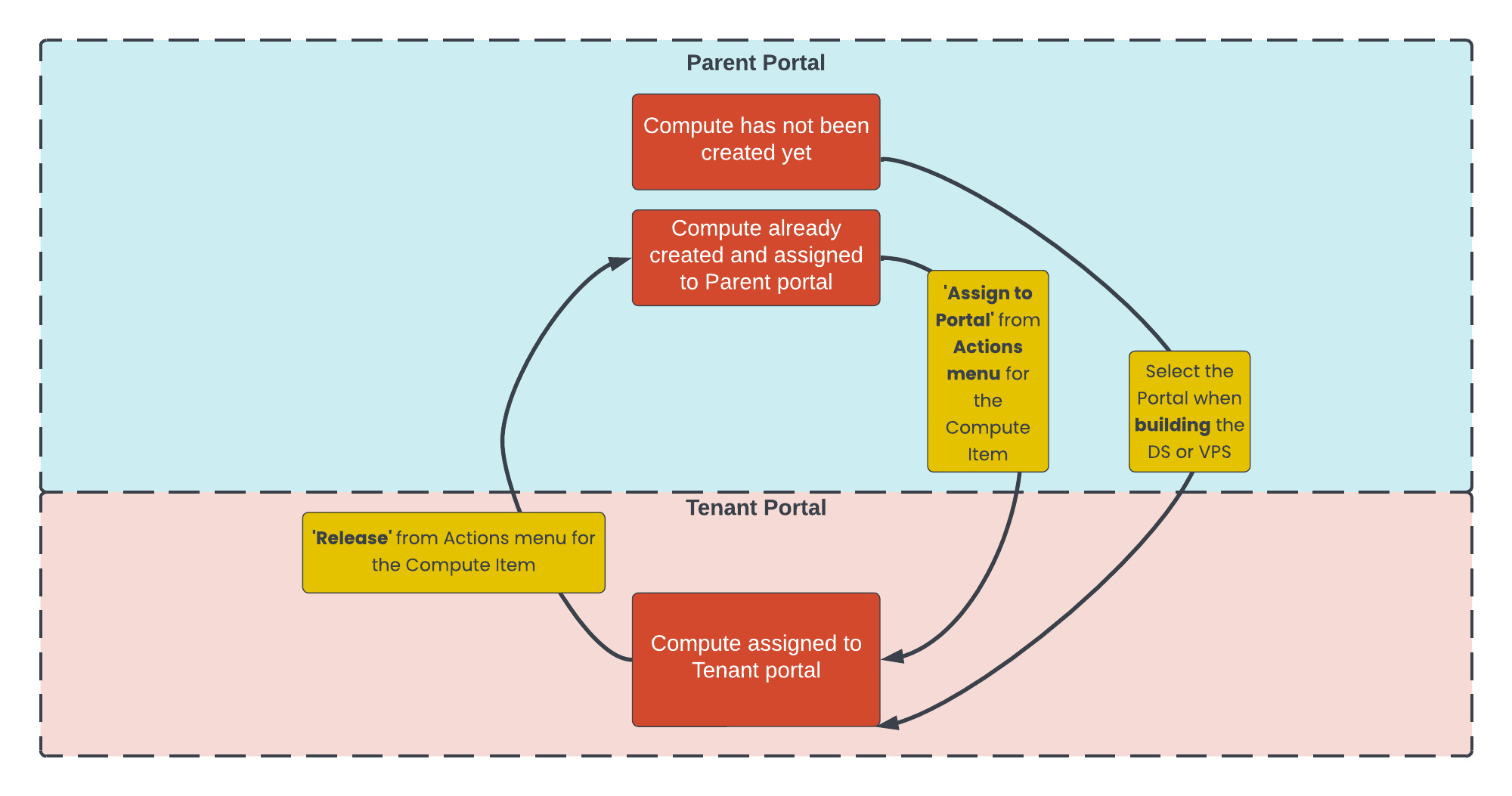
The Parent Portal is used for creating and editing Compute Items (e.g. moving to different VPS Hosts, increasing VPS capacity).
The Tenant Portal is used for viewing Compute Items that are assigned to it. This includes viewing performance metrics, accessing default credentials for compute items, and viewing Analytics.
The Parent Portal can also be used for viewing Compute Items that are assigned to it. This includes viewing performance metrics, accessing default credentials for compute items, and viewing Analytics.
The Parent Portal is used for actions and visibility across the Availability Zone. For example, overview of physical equipment in each Rack ('Rack Overview' page), overview of physical hardware status and allocation ('Physical Compute Overview' page), overview of VPS Cluster and VPS Host capacity ('Virtual Compute Overview' page).
The compute/{compute_uuid}/release API endpoint is used to release compute. The Proximity Cloud: API Worked Examples guide also includes fuller examples of deploying compute to a particular Tenant portal, and releasing it from a Tenant portal.
It’s important to note that ‘Releasing’ a Compute Item from a Tenant Portal does not decommission this compute item, or remove remote access (e.g. SSH, RDP, any application protocols) to this compute item. These decommission tasks can be completed from the Parent portal (once the Compute Item has been released to it) or by Beeks Support staff.